1️⃣ writer.py 역할
-. writer.py는 가공된 DataFrame을 결과물로 변환한다.
-. 입력 : List[pd.DataFrame] / processor에서 받음.
-. 출력 : Excel 파일
2️⃣ 실제 코드
# app/pipeline/writer.py

from pathlib import Path
from typing import List

import pandas as pd

from app.utils.logger import get_logger

logger = get_logger(__name__)


def write_excel(
    dfs: List[pd.DataFrame],
    output_dir: str,
    prefix: str = "result"
) -> None:
    """
    DataFrame 리스트를 Excel 파일로 저장한다.
    """
    output_path = Path(output_dir)
    output_path.mkdir(parents=True, exist_ok=True)

    for idx, df in enumerate(dfs, start=1):
        file_name = f"{prefix}_{idx}.xlsx"
        file_path = output_path / file_name

        try:
            df.to_excel(file_path, index=False)
            logger.info(f"Excel 저장 완료: {file_path}")
        except Exception:
            logger.exception(f"Excel 저장 실패: {file_path}")
3️⃣ main.py 수정
from app.pipeline.writer import write_excel

@app.command()
def run(...):
    ...
    dfs = read_input(input_path)
    processed_dfs = process_dataframes(dfs)

    write_excel(processed_dfs, output_path)

    logger.info("전체 파이프라인 완료")
4️⃣ 실행코드 및 결과
python -m app.main --input-path ./examples --output-path ./output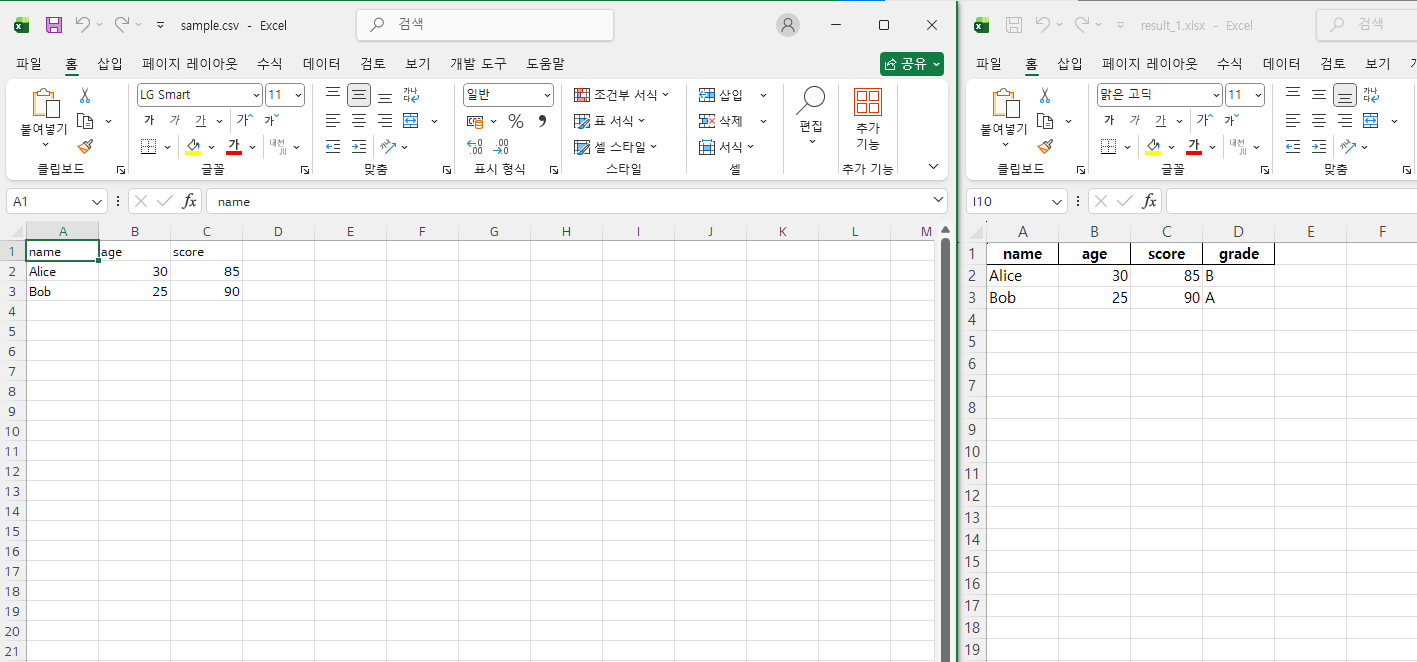
'업무 자동화 툴 킷(Automation toolkit, A.T)' 카테고리의 다른 글
| 업무 자동화 툴 킷(Automation toolkit, A.T) - 2일차 (0) | 2026.01.04 |
|---|---|
| 업무 자동화 툴 킷(Automation toolkit, A.T) - 1일차 (0) | 2026.01.02 |
| 파이썬 실습 프로젝트 : 업무 자동화 툴 킷(Automation toolkit, A.T) (0) | 2026.01.02 |